 Engineer Sushil Kumar Sushil Kumar Profile
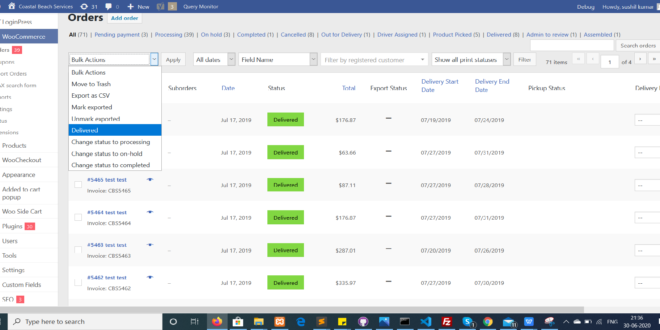
The post here Using custom bulk actions on admin orders list in Woocommerce 3 helped me to make the code. Although it mentions that you should use the functions.php to make it work, I was able to implement it perfectly in my own code.
/* Add custom Delivered order status in bulk action in WooCommerce admin order list */

add_filter( 'bulk_actions-edit-shop_order', 'my_register_bulk_action' ); // edit-shop_order is the screen ID of the orders page
function my_register_bulk_action( $bulk_actions ) {
$bulk_actions['mark_change_status_to_delivered'] = 'Delivered'; // <option value="mark_awaiting_shipment">Dlivered</option>
return $bulk_actions;
}
/*

* Bulk action handler

* Make sure that "action name" in the hook is the same like the option value from the above function

*/

add_action( 'admin_action_mark_change_status_to_delivered', 'my_bulk_process_custom_status' ); // admin_action_{action name}
function my_bulk_process_custom_status() {
// if an array with order IDs is not presented, exit the function
if( !isset( $_REQUEST['post'] ) && !is_array( $_REQUEST['post'] ) )
return;
foreach( $_REQUEST['post'] as $order_id ) {
$order = new WC_Order( $order_id );
$order_note = 'That\'s what happened by bulk edit:';
$order->update_status( 'delivered', $order_note, true ); // "my-shipment" is the order status name
}
// of course using add_query_arg() is not required, you can build your URL inline
$location = add_query_arg( array(
'post_type' => 'shop_order',
'mark_change_status_to_delivered' => 1, // mark_change_status_to_dlivered=1 is just the $_GET variable for notices
'changed' => count( $_REQUEST['post'] ), // number of changed orders
'ids' => join( $_REQUEST['post'], ',' ),
'post_status' => 'all'
), 'edit.php' );
wp_redirect( admin_url( $location ) );
exit;
}
/*
* Notices
*/
add_action('admin_notices', 'my_custom_order_status_notices');
function my_custom_order_status_notices() {
global $pagenow, $typenow;
if( $typenow == 'shop_order'
&& $pagenow == 'edit.php'
&& isset( $_REQUEST['mark_change_status_to_delivered'] )
&& $_REQUEST['mark_change_status_to_delivered'] == 1
&& isset( $_REQUEST['changed'] ) ) {
$message = sprintf( _n( 'Order status changed.', '%s order statuses changed.', $_REQUEST['changed'] ), number_format_i18n( $_REQUEST['changed'] ) );
echo "<div class=\"updated\"><p>{$message}</p></div>";
}
}
